
Building the Customer Notification Function
How I turned legally required customer notifications from an on-demand scramble into an organized, solo-run operation
Snapshot
Company: Intuit Mailchimp
Role: Principal Corporate Communications Strategist to Principal Lifecycle Manager, Lifecycle: Customer Communications.
Scope: Created a customer notification function from scratch for a company in a period of hyper growth. I developed the intake and briefing process, created templates for common notification types, and laid out playbook anyone could follow.
By the numbers:
1 playbook for how to build and send customer notifications, and what teams to get involved
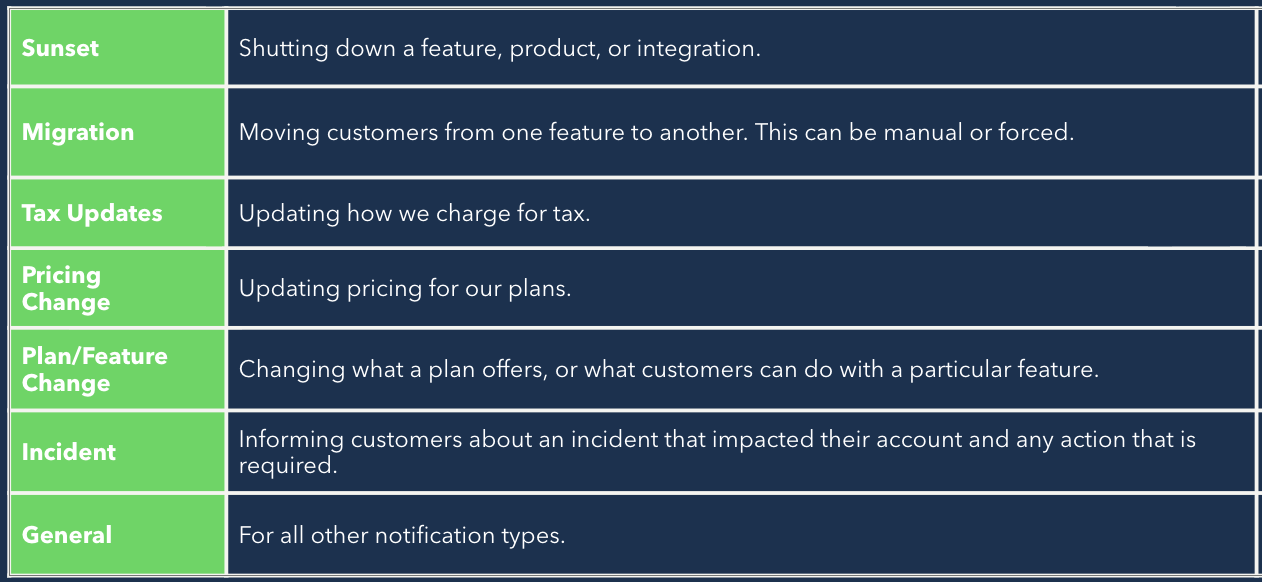
1 brief for requesting teams, and 7 templates for common notification types
2 service models matched to a risk rubric for folks to use if I was unavailable for a project
1 AI copy editor to help create legally sound, tonally correct email drafts
The Challenge: Accept the Job Nobody Wanted
By the late 2010s, Mailchimp had a user base well into the millions and had reached the point where someone needed to communicate the messages nobody wanted to be responsible for: we’re raising prices, say goodbye to that feature you use, tax laws changed where you live so you’ll see an increase on your bill. These notifications are legally required, can be a major brand risk, and can’t be tested for effectiveness before they’re sent.
It wasn’t a flashy job. You can’t really tie customer notification work directly to revenue gains or churn deflection. Nobody gets energized when hearing about customer notifications at a company-wide meeting.
That said, I recognized the need for someone to take on this role, and I wanted it. My background in corporate communications and previous experience writing help documentation at Mailchimp made me a good fit for the job. I loved the idea of solving a major problem time after time: how do we inform customers of a change while also ensuring they feel respected and know what to expect next?
Requests started to arrive ad-hoc from product, legal, and engineering teams, each with different assumptions about timelines, the approval process, and what an email should sound like.
There wasn’t a playbook, so I made one.
Building the System
A template for every kind of news
I wrote 7 templates to cover the notification types I regularly found myself writing. Each template was created and adjusted based on years of me doing the work and understanding what works. Finding out what worked meant staying close to frontline teams, to hear what parts of the messaging confused or riled customers.
The templates give a starting point with bracketed pointers. I used the templates myself, but I made them so anyone could draft a customer notification if I wasn’t available.
The brief is my copilot
Since I did this work solo, I relied on a brief to get the initial info I’d need from requesting teams. This helped me kick off the strategy, while also ensuring the teams understood they were accountable to provide the information I needed to support their project.
Sometimes boring is good
Our email ops team mainly built beautiful, colorful, image-filled marketing campaigns. I asked them to help me create the most boring, brand-compliant template possible.
This was partially due to legal requirements—transactional emails can’t appear to be marketing emails, and the message has to be front and center. But a boring email is also tactical—when you’re delivering bad news, it’s sometimes good if someone is too bored to read the whole thing.
I used this template for every customer notification, so when people saw it, they understood it was different from a marketing email (especially important if they were opted out of marketing comms). For emails that I wanted customers to read, I relied on headlines and bulleted lists to help make the content easy to scan for what was important.
Creating a Plan to Run Without Me
I performed this role alone for seven years and took minimal vacation time. (I’m not proud of this!) When my parental leave was coming up, I knew I needed to build something that let folks continue any work that required customer communication.
Beef Up the Playbook
Admittedly, a lot of the details of getting a customer notification from start to finish existed in my head. So I needed to take my thin playbook and add in all the details someone would need to create and send a customer notification.
The main task was to document clear workflows that anyone could follow along to get from kickoff to email send. Every notification takes the input of a dozen teams, so the playbook includes a table that lists out who approves, who's consulted, and who's informed. The nitty-gritty details were added in, too, including data requirements, realistic timelines, and escalation paths.
Right-sizing the process to the risk
Not every notification deserves the same level of oversight and stress. But I knew this would be a tricky thing for anyone who wasn’t me to judge. So, I built a risk rubric with easy-to-define considerations and matched the rubric to two service models. Low-risk notifications would run through a self-serve model that leans on the email templates and an AI copy editor, and high-risk notifications would get assistance from our creative team who I coached before leaving.
An AI helper
I trained an AI copy editor on our voice, style, and compliance rules and added it to the self-serve workflow as a way to get non-writers close enough to a good customer notification. It's a small piece, but it helped improve the quality of the copy without adding to SLAs by needing to run copy through the creative team.
The Proof
I knew I successfully built a function when I saw that it was able to run without me. Teams continued to get notifications out the door and marketing leadership remarked on the usefulness of the AI copy editor. I did not return to Mailchimp at the end of my maternity leave, but I heard that my documentation and past communication strategies continue to be the source of truth for Mailchimp’s customer notifications.